
Render mermaid plots
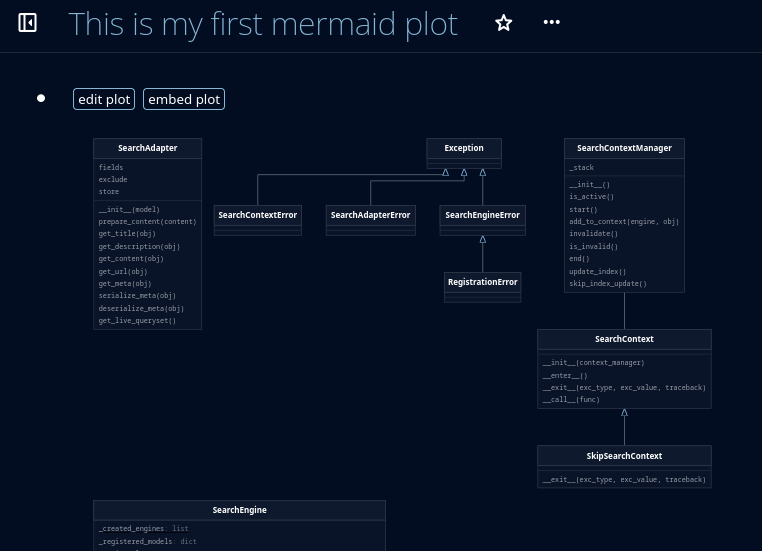
This query takes a mermaid file (a textfile with the file-ending .mmd) and renders it server-side with beautiful-mermaid.
Additionally, two buttons are displayed that offer further actions:
-
"Edit plot," which navigates to a page where the
.mmdfile can be modified and re-rendered. -
"Embed plot," which enables dynamic rendering. The plot is then saved as an SVG in the assets, the image is embedded using Markdown syntax, and a link to the original
.mmdfile is included. Then the file will no longer be dynamically generated when the page is opened, but will be loaded directly (significantly faster). If the file has already been generated, the existing SVG will be used.
mermaid plot query |
mermaid plot query | plot query |
|---|---|---|
| source of information | mermaid file in assets | block-properties in the journal |
| editor | looksyk mermaid asset file editor | directly in the journal files |
| styling | native styles from your personal looksyk design | native styles from your personal looksyk design |
| speed | slower (realtime rendering), fast when embedded | fast (realtime rendering), fast when embedded |
Quick example:
{query: insert-mermaid-diagram target-file:"my-diagram.mmd" theme:"custom" display:"diagram" }
Configuration parameters:
| Parameter | Description |
|---|---|
| target-file | Name of the .mmd -file in the assets. |
| theme | Insert value "custom" to use your own looksyk graph design. To use the default colors, type "basic" |
| display | Type of plot. Currently supported: diagram. |
Supported diagram types
- Flowcharts
- State
- Sequence
- Class
- ER
- XY Charts (bar, line, combined)
Read more at the beautiful mermaid documentation